Important account information for you
DCU is providing you with additional resources you need to ensure a smooth and seamless transition as we integrate our banking systems.
Resources and Information
In service of our promise to give advance notice, time to prepare, and extra guidance and help as needed, we are here to help ensure your deposits, payments, and transfers continue to process as expected. Using these additional resources and direction can assist with updating your information as needed.
How to Find Your New Account Number
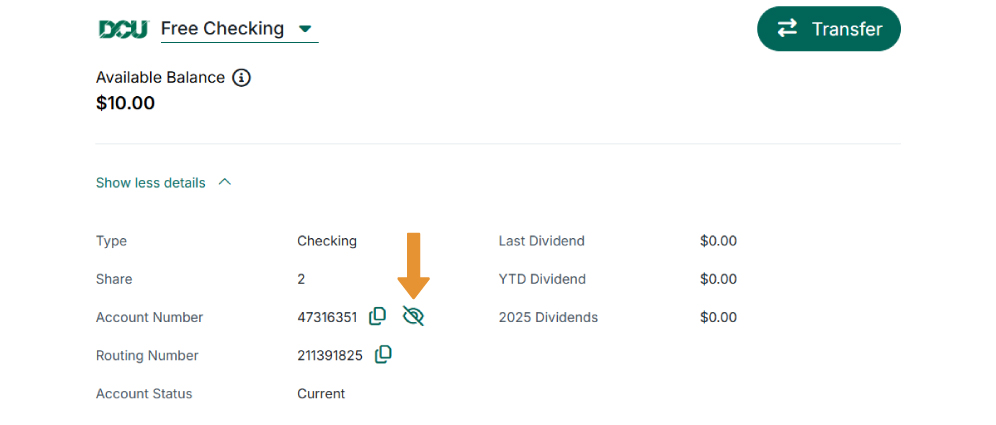
On Desktop
- From the home screen, select your account.
- Click show more details.
- Navigate to the eye icon to display your account number.
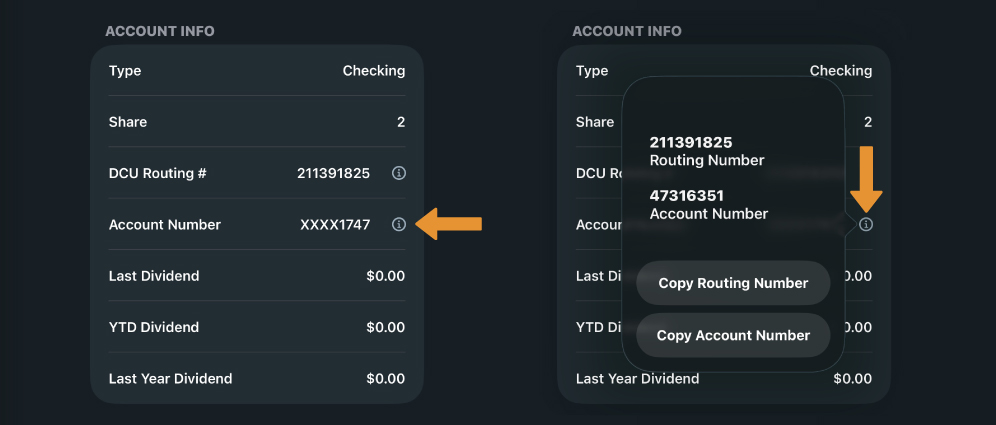
On Mobile
- Tap your account.
- Choose details.
- Select the 'i' icon to display your account number.
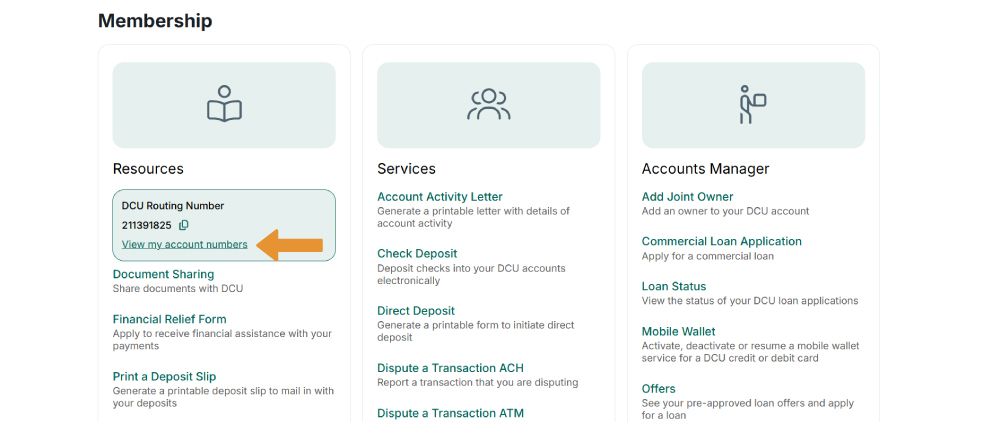
Membership tab
- Select view my account numbers.
- DCU Routing and Account Numbers.
Frequently Asked Questions
When the two divisions come together in 2027, having checking or money market accounts with the same account number could result in transactions being posted to the wrong account. We know that having reliable access to your money is key and is a responsibility we take seriously.
To ensure your funds can accurately move in and out of the correct accounts, along with security and fraud protection, we are unable to have two share accounts with the same number. These numbers have been updated systematically, and there is no option to opt-out of this change.
No, the only share number account that requires attention is the duplicate one.
A secure message will be sent to your Inbox within Digital Banking including both your old share account number and the new one. You will see your new share account number when you look at your account details. Use the new number to update your incoming direct deposits, automatic payments, recurring debits, and external account transfers.
Both your old and new account numbers will continue to work for transfers and transactions until we combine our core systems April 30, 2027. However, to ensure that you have time to make updates to any automatic payments, Bill Pay payees, or direct deposits, we recommend having your account number updated with any services within 90 days of receiving a notice from us.
No, the DCU routing number (211391826) should still be used.
If your deposits are for payroll, you can give the new account number to your employer to update. Please use the form available in Digital Banking if your employer asks for one.
If you have direct deposit connected to a third party, you will need to update the share account number information to ensure your deposit is processed. For example, if you receive monthly Social Security deposits, you will need to contact the Social Security Administration and provide your new account number (www.ssa.gov * or 800-772-1213). Direct deposits to other, non-affected share accounts will not be impacted.
*You are about to leave the DCU website. You are about to enter a website hosted by an organization separate from DCU. Privacy and security policies of DCU will not apply once you leave our site. We encourage you to read and evaluate the privacy policy and level of security of any site you visit when you enter the site. While we strive to only link you to companies and organizations that we feel offer useful information, DCU does not directly support nor guarantee claims made by these sites.
No, a new debit card is not necessary. Scheduled payments connected to your DCU Debit Card do not need to be updated.
If your payment services are connected to the impacted share account number, you will need to update each service with your new share account number to ensure transactions post correctly and you don’t experience missed payments or incoming deposits. This includes external account transfers to other financial institutions.
While you can continue to pay your bills with automatic/recurring payments, you must update each of those payments with your new share account number to ensure they are processed correctly. If you do not update your account number, payment service may be interrupted. If your payment services are connected to the impacted share account number, you will need to update each service with your new share account number to ensure transactions post correctly and you don’t experience missed payments.
While we will make every effort to support you through this process, by not taking the necessary steps to update your share account by April 30, 2027, you may experience missed payments, incoming deposits, returned transactions, or service interruptions with the third-party services.
If you do not update your share account number information with relevant bill payers – those who receive funds through the duplicate share number account - it may result in missed payments, returned transactions, or service interruptions.
We will keep DCU.org updated with more information about the merger process; learn more here. You can also expect to receive emails throughout the integration process. Of course, if you have any questions regarding the merger, please send an email to Merger@FirstTechFed.com. For account-related questions, please contact us by phone (800.328.8797), email (dcu@dcu.org), or visit a DCU branch.
You can contact us by phone (508-263-6758), email (dcu@dcu.org), or visit a DCU branch. We are here to help.
Contact Us
If you have questions about updating your information, next steps, or a topic not covered here, contact us:
Because at DCU, people come first.

853 Donald Lynch Boulevard
PO Box 9130
Marlborough, MA 01752-9130
ABA Routing Number: 211391825
NMLS# 466914

Federally insured by NCUA

Equal Housing Lender
Federally insured by NCUA
Equal Housing Lender